January 27, 2014
When you hear the term User Experience Design, what comes to mind? Do you instantly associate the term as another gimmick? Or maybe it's another trend delivering empty promises, like; “Make your business more efficient by creating a better experience for your customers." These are all common responses, albeit misguided. What you may not realize is that User Experience (or UX) is the result of detailed research and analysis of users, harnessing that information to predict their actions and needs, and ultimately creating a better project.
Too often people assume that UX design is merely a supplementary feature to "woo" their clients, peers, and colleagues. However, thinking of UX as a secondary need can be a fatal flaw to your approach. Designing “smart” UX doesn’t mean hiring consultants to provide their insight and direction after your product is already made. UX design should be viewed as a organization-wide effort capturing your company’s vision.
Here are three things to keep in mind as you build for User Experience:
1. Design is just a small part of the process
UX is not just about design. It's actually a small piece of the puzzle. You can't create a good design without doing the heavy lifting upfront; gathering and analyzing data. User patterns and behavior, stakeholder expectations, current pain points, and company vision must all be understood before a new design can be considered.
The process below details how data is collected and analyzed throughout a UX build:
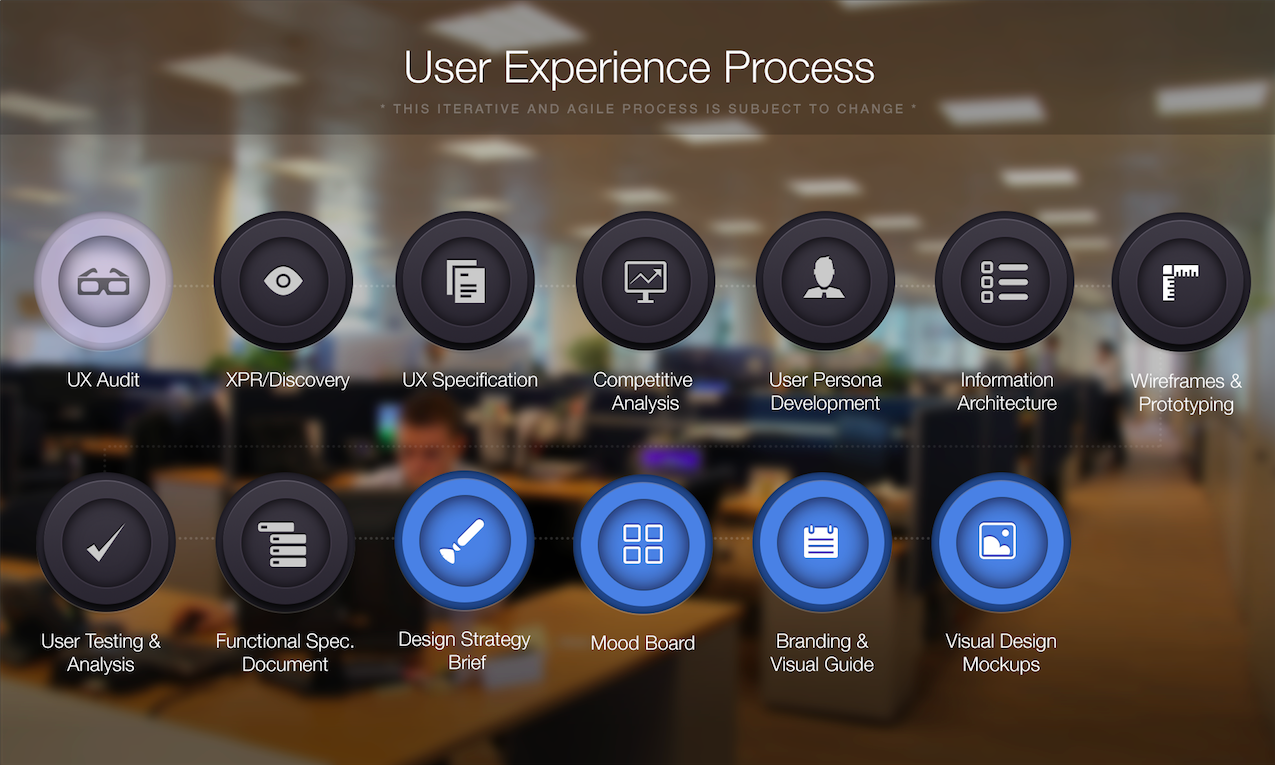
The UX process (shown above) involves this iterative and agile process that sometimes changes throughout. The steps are more outlined below:
- UX audit
The method for finding usability problems in existing user interfaces in accordance with established usability principles. - XPR (user eXperience Process Review)/Discovery
Review of current, desired, and future state of the project. This is what drives UX strategy. - UX specification
A document created outlining the main UX based components of a project from pre-project to go-live. - Competitor analysis
Competitor, stakeholder, and user/customer research that outlines good (or not so good) practices in the field. - User persona development
Focused, concise user models, grouped by similar behavioral patterns. These will be used for all UX related decision-making. - Information architecture
The first step in UX Strategy: Structural categorization of content to generate approaches/solutions for user journeys, actions, and navigation - Wireframes
Represents page layout and content, including elements and navigational systems, and how they work together. Does NOT include styling, design, color, etc. - User testing & analysis
Usability testing is a technique used to evaluate a product by testing it on users. Used to validate research and design. - Functional specification
document In collaboration with a Technical Architect (TA), it includes wireframes and notes about functionality including Salesforce labels. - Design strategy brief + mood board
A comprehensive document written specifically for the designer outlining business, branding, and styling needs. This document is focused on the desired results of design, not aesthetics. Mood board is used to capture styling needs to provide direction for the design. - Branding & visual guide
Extensive guide (for developers) outlining style guidelines, including color palette, typography, image styles, and logo usage. - Visual Design Mockups
Photoshop-ready designs of the final product. Commonly referred to as "mockups" and are developer-ready files for slicing.
Design is not just what it looks like and feels like. Design is how it works.
− Steve Jobs
2. The UX process takes time
With pressing deadlines and budgets, it's easy to want to shave off features and functionality that may seem supplementary. However, what you may save in time (or money) can be crippling for your overall product.
When you cut corners in UX, the end result can be a staggeringly beautiful application design, but with poor usability and adoption. You must respect that this entire process takes time, and allot an appropriate timeframe around all deliverables. Ample time will result in a product that is both beautiful and functional.
3. Listen to the Data
You can avoid the loss of thousands (or millions... gulp!) of dollars and hours of time wasted by following this process. The focus of an UX design team should be to gather analytics and information to make informed design and usability decisions. There are two general types of data: quantitative data (numerical data that shows the who, what, when and where) and qualitative data (non-numerical data that demonstrates the why or how). There are many different tools (Google Analytics, Kissmetrics, Mint, Open Web to name a few) that can provide the results needed to make good decisions that provide better insight and encourage more productivity or conversions for your product.
Good design makes information clearer to understand and makes data easier to consume, but great design is driven by user research and analytics—providing real value and creating evangelists of your product.
What makes people passionate, pure and simple, is great experiences. If they have great experience with your product and they have great experiences with your service, they’re going to be passionate about your brand, they’re going to be committed to it. That’s how you build that kind of commitment.
– Jesse James Garrett
Interested in learning more about Bluewolf’s Mobile and UX practice? Join Jesse Endo, Director of Innovation for a discussion about the launch of Salesforce1 and top considerations for your 2014 mobile initiatives. Register now