July 9, 2015
Every email service provider (ESP) and marketing automation tool has its own quirks, annoyances, and pull-your-hair-out frustrations. Working with Salesforce Marketing Cloud (SFMC), Marketo, and Eloqua, I have come to know and expect common mishaps — and, fortunately, have come up with workarounds.
SFMC has always had its eccentricities, but I am happy to share that three of my personal pet peeves have been solved with the most recent release: broken links, slow load times, and branded uneditable headers and footers are now a thing of the past.
Be gone, broken links!
If your stomach has ever dropped upon realizing that a link in the email you just sent directs you to 404 purgatory (QA process, anyone?), then you know the frustration of being powerless to correct it. Now with the Account Administrator or Content Creator roles, you can edit the links in a specific job directly from your account, after the job has been sent. There are two places from which you can make edits:
- Under Tracking Details on the Job Links tab in the “Sends” section of Tracking
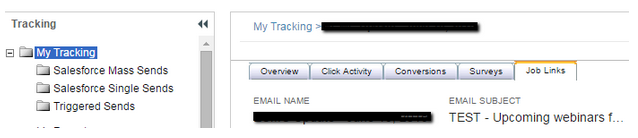
- Under Past Sends and Job Links in the “Emails” section of Content

Hit turbo speed.
SFMC is a powerful platform, but let’s admit it: it’s never been the fastest loading platform. If you have been on the platform for a while, you most likely have a large number of emails stored in folders. This update will speed up the navigation tree and email loading time, while significantly decreasing save time for new emails you create.
Pro Tip: Have an archive folder within your foldering schema to save even more time.
No more “powered by.”
SFMC has created the ability to change the default footer within the account settings in the admin tab causing all SFMC developers to rejoice! This alleviates the frustration of not being able to edit the footer of your emails. Previously, your options were to turn them off completely, requiring SFMC to make that change, or to create a delivery profile with the footers turned off, requiring you to include CAN-SPAM info in every HTML paste email you create.
These are but a few highlights from the many updates the June 2015 release brings. You can read more about what else has been added in the full release notes.
How will these updates impact your marketing efforts? Leave your thoughts in the comments below. To do more with Salesforce Marketing Cloud, get in touch with our experts.


