January 22, 2014
Earlier this month, salesforce.com posted notes on their upcoming Salesforce Spring ‘14 release. A key part of this particular seasonal update is the alteration of Forecasting tools. Salesforce.com has decided to sunset Customizable Forecasting, ceasing all further development immediately. With the full retirement of “Forecast 1.0” in Summer '14, users must turn their focus to Collaborative Forecasting for all future efforts. In this blog post I will explain both Customizable and Collaborative Forecasting, show where they overlap, and highlight the Forecasting changes set to take place with the Spring ‘14 release.
The fact that development has stopped for Customizable Forecasting tells us that all new features will be around Collaborative. For those who haven’t implemented Forecasting yet and plan to, it would benefit you to understand what Collaborative Forecasting can and can’t do. Furthermore, to those who have already implemented Customizable Forecasting, this post will help you understand the differences so you can begin a migration plan knowing the retirement of Customizable is inevitable.
Customizable Forecasting
Customizable initiates with the salesperson setting personal overrides and submitting a forecast. Their opportunities “roll up” by category and the overall number for the categories “Commit” and “Best Case” can be adjusted and then the forecast submitted. The salesperson can submit multiple forecasts. The submitted forecasts are kept in an object for Forecast History. The manager can review the forecast of direct reports and make their own adjustments. They can choose to accept it as is, reject their direct report adjustments, or reject all adjustments or set their own override amount. The focus of the Customizable forecast is around the submitted records for that period.
There are a few features that are only available with Customizable Forecasting, not in Collaborative:
- Customizable Forecasting allows organizations to use the Salesforce Territory Management functionality and Custom Fiscal Years.
- It allows users to make Opportunity-level Adjustments and share their forecasts with other users outside their hierarchy.
Collaborative Forecasting
Collaborative Forecasting initiates with the Sales Manager reviewing their direct reports and adjusting their forecasts.
With Collaborative, direct reports do not adjust nor do they submit any forecasts and none of the forecast history is maintained. The focus is around the opportunity records and adjusting in real time.
Features available in Collaborative Forecasting, but unavailable with Customizable Forecasting:
- The ability to rename categories
- The ability to view opportunity splits within the forecasts
- One-click opportunity list filters and sorting
- Expandable forecast tables
- Default forecast currency setting
- Chatting in real time
The Forecast tab connected to Collaborative tries to be a one-stop shop for all forecasting needs. It’s designed for expanding and collapsing not only the forecasting data but the detailed information as well. This allows for cleaner views of the data.
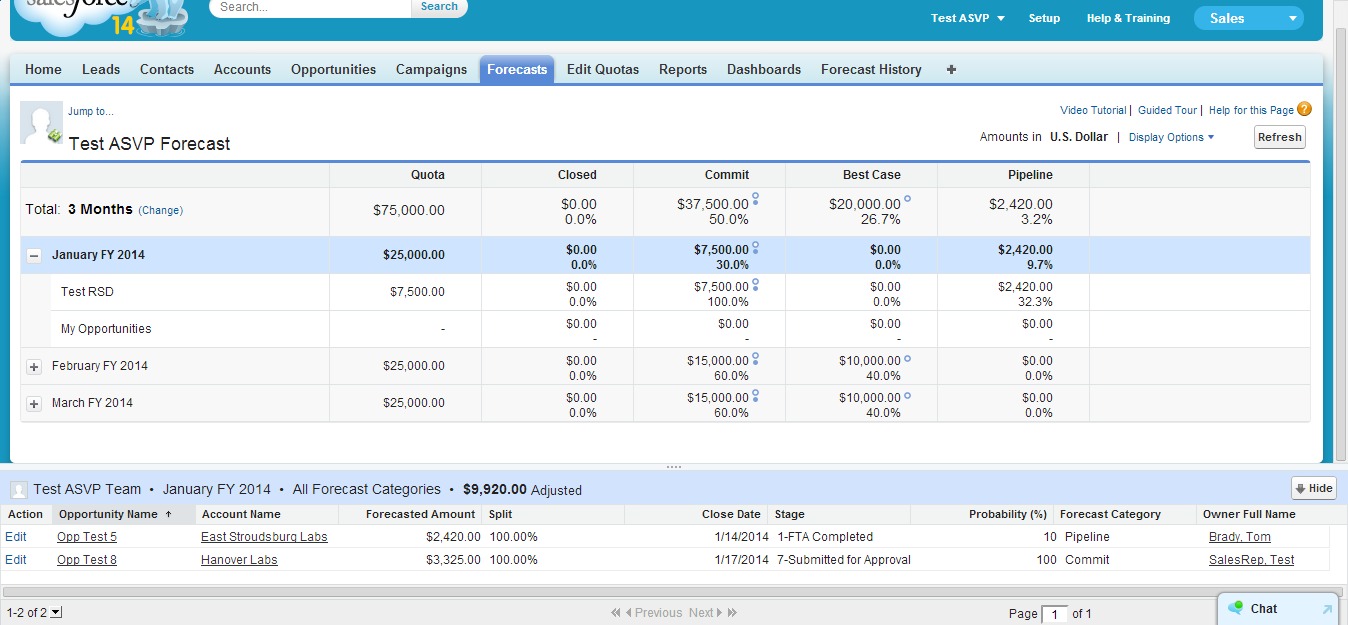
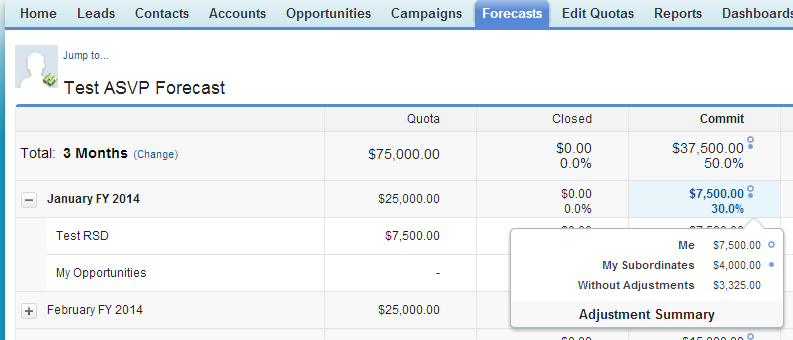
Within the forecasting tab/page, users will find various links in-line with the data that allow for editing, filtering and sorting. Managers can view forecast override data by hovering over data points that display icons next to the forecast amount and units.
In addition, when the user clicks on a direct report, a pop up menu of communication methods to that user appears. 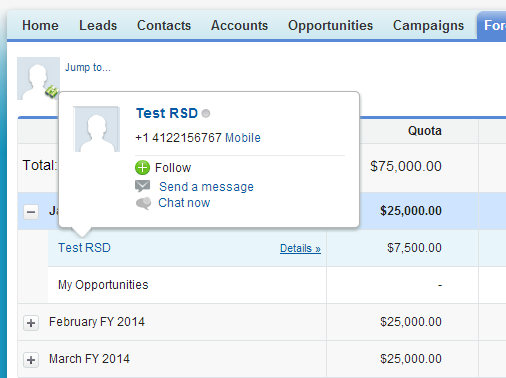
Finally, Collaborative Forecasting provides additional display options to include Quotas and Quota % Attainment. Salesforce Forecasting becomes a business intelligence (BI) tool with the Collaborative option, focusing on the sales funnel and pipeline rather than submitted numbers.
Common Features between Customizable and Collaborative Forecasting
The two forecasting types share a lot of the same capabilities which I have listed below or you can look at a comparison chart published by Salesforce help.
- API Access
- Automatic Rollups
- Individual Forecast Range Selection—controlled by user
- Map Forecast Categories to Opportunity Stages
- Monthly Forecasts
- Multiple Currency Support
- Opportunity Stage
- Override (Adjust) Forecasts
- Partner Opportunities in Forecasts
- Product Family Forecasts
- Quotas
- Quantity Forecasts
- Quarterly Forecasts
- Reports and Dashboards
- Revenue Forecasts
- Sortable Opportunities List From the Forecast Page
Lastly, both use hierarchy to determine roll ups which is automatically generated based on your company’s role hierarchy.
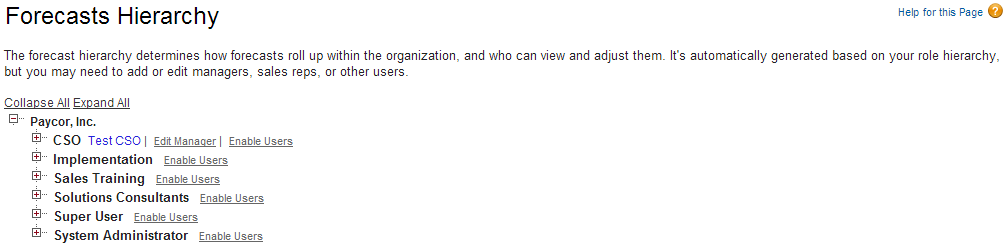
If you need more information about role hierarchy or other security related questions. Solution Architect, Jon Tresko has published a series of articles that detail everything you will need to know about Salesforce security.
Spring '14 improvements to Collaborative Forecasting
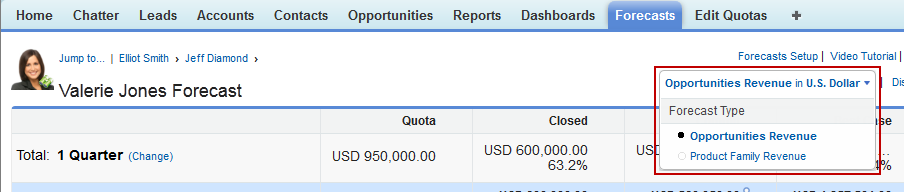
When Salesforce Spring ‘14 goes live, there will be a few more improvements to Collaborative Forecasting. First, your users will be able to use multiple types of forecasts. This will allow the user to predict sales from multiple perspectives. Here are the types of forecasts users can choose from:
- Opportunities based on revenue, quantity, or both
- Opportunity splits based on revenue
- Product families based on revenue, quantity, or both
The Forecasting setup has changed to accommodate new forecast types. Instead of just one drop-down box to pick the forecast type, users can now add up to four types. Each type can be configured as either revenue or quantity, with each having their own set of columns to display the related lists of opportunities. Your sales forecast users can change the forecast view from one type to another through a drop down on the Forecast page.
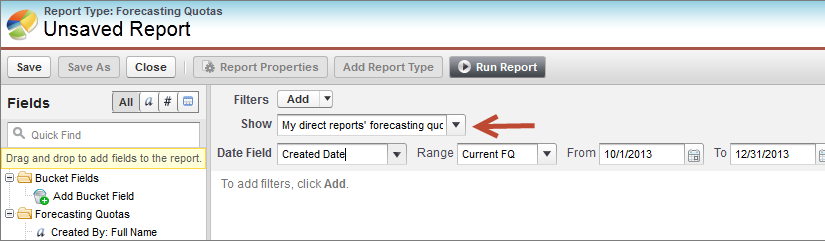
Another improvement for Collaborative Forecasting is within the reporting of forecasts. Sales Managers can now easily display results by forecast type. Managers can also filter reports to display data for only their direct reports. Through custom report types, the forecast type field will be included by default when you include either Forecasting Items or Forecasting Quotas as the primary object.
The Future of Salesforce Forecasting is Collaborative
If your organization is implementing forecasting within Salesforce, you need to look at the subtleties between the two current methods. That being said, Collaborative Forecasting is the default that comes with any new Salesforce org, and after this latest announcement, is the future. If you already have Customizable installed, you will need make a plan on how to migrate to Collaborative. There is a migration planning help page available on the Salesforce help website that explains the considerations and details of that migration.
With Salesforce constantly updating and shifting to meet customer needs, it can be difficult to stay on top of the latest Salesforce functionality and trends. We surveyed 1,500 companies to determine the top Salesforce trends you need to know in 2016 and compiled them here: The State of Salesforce Report.


