February 27, 2014
Marketo clients are lucky enough to see great product updates every month, and this month is no different. The big focus over the last few releases has been enhancements to campaign assets, increased visibility into a lead’s engagement, and the way leads are interacting with your assets. The February release continues this theme. Marketo is working hard to give users more robust tools for campaign building and the right tools to build engaging content.
Asset Enhancements
One of the major initiatives for Marketo has been “Forms 2.0”—a collection of enhancements to forms that allows marketers to create the most engaging and highest converting forms possible without the need of a developer. This release we also see features around increased visibility into an email’s audience as well as more comprehensive reporting.
Dynamic Form Fields for Form 2.0
The January release gave us Forms 2.0. The aim of this initiative is to provide marketers all of the tools necessary to build functioning, engaging forms easily through Marketo’s UI.
With this month’s release, we now have the ability to hide or show fields or field sets dependent on selected values. This feature is key for marketers without developer bandwidth.
In the past, you could only accomplish this with JavaScript. Once again, Marketo is giving marketers the tools to own marketing campaigns and create their own assets without extensive coding knowledge.
By leveraging dynamic form fields in your forms, conversion will be positively affected. Nothing hurts form conversion like asking for too many questions. Also hindering are fields that are not relevant to the user. If you ask a person from Europe to pick their state it may confuse the user enough to discourage them from completing the form—even if the field is not required. Note that this functionality is only available to users with IE9 or newer.
Increase Insight into Email Audience
For many Marketo administrators it can be confusing when the number of emails sent was much lower than expected. Often this is due to leads being unsubscribed, bounce backs, or even just having a blank email addresses. As of this release, you will now have visibility into which leads are blocked from the mailing list.
The biggest win from this feature is the ability to better QA outgoing campaigns, gauge impact of an email communication, and remove confusion around mismatched metrics while also allowing marketers to be more proactive with junk leads.
Reporting by Email Groupings
If you have several automated nurturing campaigns running you will want to report not only on an individual email, but also by groups of emails. The new reporting feature allows you to report on email performance by Program Name, Channel, and Tags. If an email is a local asset to a Program, a Program name is added to the Email Name field, allowing for more comprehensive reporting. These groupings give you more insight into how a specific channel or event is performing, as opposed to individual emails.
Database Engagement
The increased insight into the performance of assets and the engagement of leads gives marketers the information needed to make decisions about specific content or assets to use in their marketing mix. Knowing what’s working, and more importantly, implementing what works the best is now easier with this release.
Actionable A/B Tests
We all know that A/B testing is powerful. It allows us to make data-driven decisions about the effectiveness of copy and calls to action. However, a common the problem with A/B testing is that even with clear results, many of us forget or don’t have time to implement the winner.
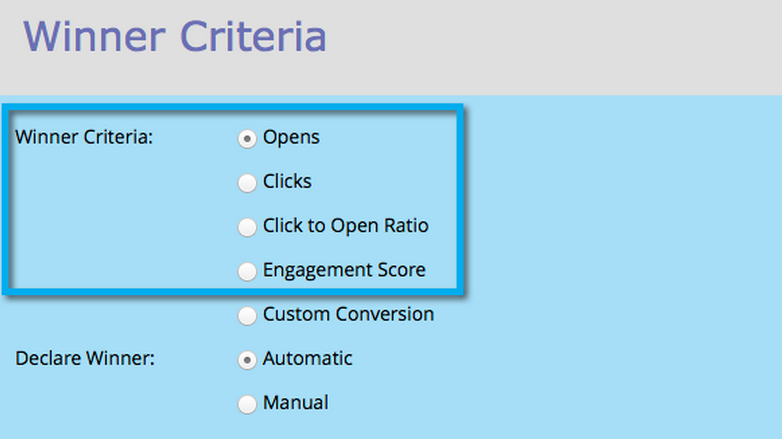
With Marketo, you can define the “Winner” of an A/B test used in the new email “blast” program released not long ago. Then, Marketo is intelligent enough to automatically implement the winning email across your campaign.
You can define the winning criteria as well as schedule the test to run for a certain period of time. And, just in case the automation scares you (don’t worry, it takes time), you can choose to receive the results via email before officially approving the winner. However, in the case of testing the performance of different dates, the implementation must be manual.
With this release, you have a new option of an “engagement score” to help define the winner. This engagement score is a proprietary formula out of 100, based on clicks, links, opens, and unsubscribes. As a marketer, this gives you the insight to pick the email that yields the highest interaction among leads, thus adding more dimension and weight to your A/B test. This new feature should help implement only the most engaging content into your marketing mix.
Qualifying Engaging Emails
The new updates for the Engagement Stream Performance Report allow users to compare assets based on engagement score. When comparing emails and analyzing the performance of your content, you can now do so against an overall proprietary formula, instead of looking at opens and click-throughs individually.
With this new insight, marketers can make data-backed decisions to promote or replace specific content. These actions will lead to a more engaging relationships with your database.
With each Marketo update, marketers are provided with improved tools to build better campaigns and engage their leads. The February release aims to improve asset management and lead engagement, resulting in more efficient and successful marketing efforts. To see how innovative companies are harnessing marketing automation tools like Marketo, download our free guide, The Three Pillars of Modern Digital Marketing.