October 30, 2013
MDM’s history is more of an evolution, spurred by natural side effects of businesses processes moving into computer applications. As this happened, ERP (Enterprise Resource Planning) systems arose in the early 90’s in an effort to consolidate a company’s many departments and processes. These systems were typically spun from a department core, such as manufacturing, accounting, human resources or supply chain, and developed outward to represent the larger whole of a company. The data contained in an ERP system would typically be considered the ‘master,’ as the core data tables could be leveraged in different parts of the system. This satisfied the needs of most companies to maintain a consistent dataset across the enterprise, but as time went on, single ERP systems were not always the answer for the ever-evolving ways of doing business. As additional systems were included that specialized in certain functions, such as accounting, manufacturing, customer relationship management, etc. the need arose for solutions to better maintain data consistency across the enterprise.
Since then, ERP, Database, and extract, transform, load (ETL) vendors have all jumped on to fill this need.
So what are some of the modern developments of MDM?
I’ll keep this really simple: all MDM tools (with a few minor exceptions) effectively do the same exact thing. That’s right, it is very difficult to tell the difference except for small features such as web-services APIs. It really comes down to vendor preference, compatibility with architecture, and cost. So rather than doing a complete MDM vendor comparison (which you could easily find here, here, and here) let’s focus on some of the major components and why they do nothing for your business on their own.
Cross-reference tables
Cross-reference tables are one of the principal products of MDM. When addressing several systems across the enterprise, with the same accounts or contacts for different reasons, it is wise to join them all together and assign a global ID, while standardizing the address and such.
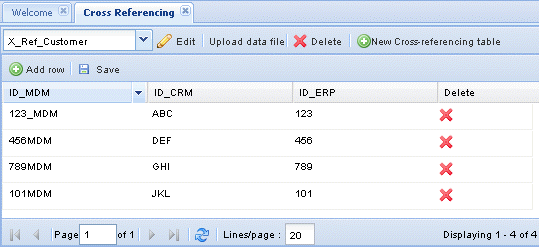
This is a much needed component, but what does it do for your end-users and business processes? The implementation of this takes various shapes and forms, but as accounts and contacts are being ‘merged,’ there is usually additional manual admin work that needs to be done to handle the merges in all the systems and re-parenting all the child records beneath them. What a pain!
Account and Contact Hierarchies
In many cases, there can be multiple hierarchies maintained for the same accounts. One for Legal structure, one for Sales or procurement channels. For example, these hierarchies might be maintained in one way in SAP, and another way in Salesforce. In this scenario, the need arises for a consolidated view of these hierarchies, which most MDMs do—but does this data ever make its way back to the CRM or ERP? Are tools or interfaces ever deployed for end users to work with this data and view all the order and opportunities we have rolling up under certain levels of these hierarchies? The answer is usually no. A few administrators and data people in the enterprise can use these, but often this data is never actually used for business purposes. So if it’s not helping the bottom line, why bear the expense?
Master Data Management (MDM) Strategies for Salesforce.com
While the features mentioned above are a necessary component of a strong MDM strategy, they only scratching the surface. What is generally lacking in most MDM deployments are set of tools made for the end-users of the organization, to insert the benefits of MDM into day-to-day workflows. This brings us into the next generation of MDM, tying this data back into your CRM. Salesforce is a great platform for joining all of this together. You have the ability to easily create additional tables/objects to store the data you’re generating in other systems like SAP, Oracle, or JD Edwards, and relate it all to your master account and contact records using a global ID established in traditional MDM tools.
You can also establish the more complex nature of hierarchies and relationships made possible by your MDM tool by leveraging the ability to create junction objects, with their own hierarchies, relating many contacts to many accounts, assigning unique roles. I will discuss two approaches you can take in Salesforce.com.
Poor man’s MDM
I’ve coined this strategy as “poor man’s MDM” not because you need to be in some sort of dire straights to use it, but because it’s so simple and easy to set up that anyone can take advantage of it.
To simplify things, we’ll only focus on accounts.
Let’s make the assumption that we’re a global manufacturer that owns several other companies and has several business units (BUs). Each acts as it’s own silo, with it’s own product/service lines, each making their own IT decisions and has their own relationships with accounts. Often times several BUs engage with the same accounts concurrently. This begins to cause problems as a Sales rep from one BU is walking out of an account’s building, while a rep from another BU is walking in and the only person that realizes this is the client who wonders why the reps weren’t privy to the overlap. This can send the wrong messages to your clients, as they want to feel like their loyalty to your enterprise is influencing preferential treatment and discounts, rather than conveying a disjointed image.
Well, we need to start consolidating/aggregating data from across the enterprise, so reps are able to see that their counterparts also have open opportunities. Standard MDM doesn’t help, as the only data typically sent back to the CRM is the ID’s/keys from other systems, or global MDM key. It probably won’t make sense to simply merge the account records, opening the door for major conflicts with the data, and it can make it really tough to make sense of the related records such as activities and opportunities, and where they’ve come from.
Enter poor man’s MDM!
Rather that working through all of the who’s version of the truth wins or loses scenarios, we’ll make some minor changes to the data model and insert the data accordingly.
The main concept here is inserting ALL versions of the truth, and inserting all child records related to the appropriate account. We’ll insert all accounts to the account object. This includes an account record for each business unit within your enterprise. Use record types to differentiate these:
- [Your Company] business unit
- Client (Master)
- Client via Business Unit
Next, we’ll create a new lookup relationship from account to account called “master account.” You can name this whatever you need, and the related list that goes along with the relationship “clients via BUs.”
This way, as we’re inserting client accounts via business units, we’re segregating them with their own record type and we’re associating them with the master account we already have.
Finally, we’ll create a junction object that relates the “[Your Company] business unit” with “client via business unit.”
Lastly, we modify the page layouts for each record type to include the important details and appropriate related lists:
- For business unit record type, we don’t need the KPIs or important data points such as contract expiration date or at-risk data. Include a related list of the junctions you’re creating between “[Your Company] business unit” and“Client via business unit.”
- For master account record type, we’ll include all fields relevant to your unit. We’ll also include the “Clients via BUs” related List so users can see all the different versions of this account, from all of the business units within your enterprise. You can also include all of the most important data points on this list so you can get a sense of the relationship and status of each BU’s version of this account at a glance.
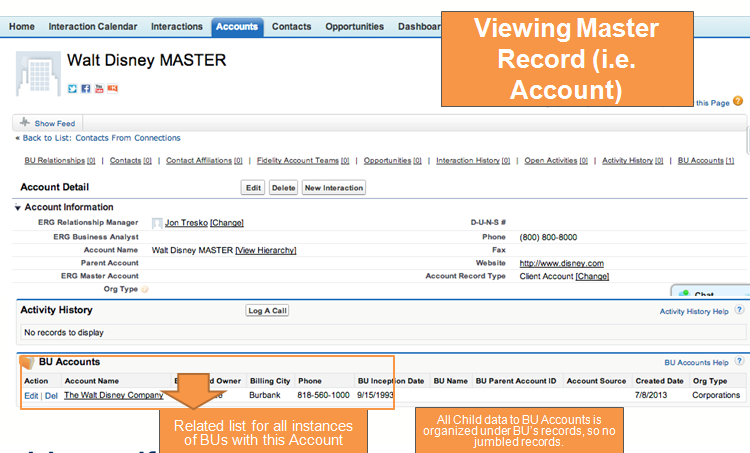
- For the Client via Business Unit, it may be similar to the master client account, although we don’t need the “Client via BUs” related list.
Now, all related activity, orders, opportunities, etc. happening within each BU are related to that “Client via Business Unit” account, and you can see all client accounts when viewing the Business Unit’s account record.
You also now have the ability to maintain a separate hierarchy for each business unit’s enterprise accounts.
You will achieve a great deal through standard page layouts and related lists, but it may become cumbersome to have to click though each individual “Client via BUs” to see the related activity. however, since we've structured the data in this way, simple VisualForce components on internal BU account and master account page layouts can structure and filter the data across hierarchies and business units, allowing you quick access to all related activity with a few clicks. This last VisualForce may be a little more costly and involved, but you can get a similar experience through custom reports that can be launched from custom buttons, like this:
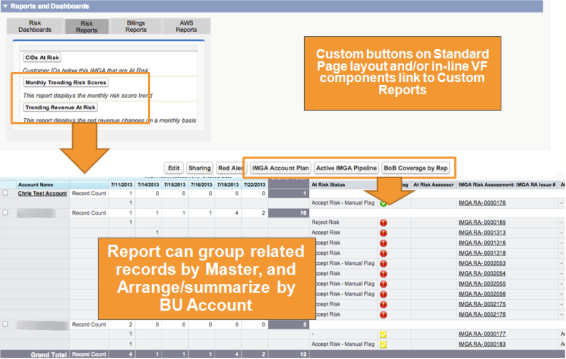
In this example, we’re identifying all accounts at risk, across all of our business units, but with Salesforce’s reporting, you can slice and dice the data in any way you want and creating the custom button is as simple. The button ‘code’ is as simple as:
https://na9.salesforce.com/[reportid]?pv0={!Account.Master_Account__c.Name}&pv1={!At_Risk_Flag__c}
Where [reportid] is the ID of your custom report, “pv0” is the first report filter for the master account name (to get all accounts within this ‘master grouping’), and “pv1” is your second report filter that can filter down to accounts at risk, or some other status filter. This is optional, and not needed if you simply want all accounts within the master, which can be summarized/grouped by business unit. To learn more about dynamic report filters via custom buttons/links, there are two great blog posts: here and here.
I’m sure my readers are all insanely intelligent and creative Salesforce admins/users/consultants, so I have complete confidence you can take these concepts and tailor them to something meaningful for your business or enterprise!
However, if you’d like a more complete and polished solution that also gets you data governance, data integrity, de-duplication and fuzzy matching tools, read on for an awesome app from Informatica.
Informatica Cloud MDM
Informatica is best known for their Enterprise-grade ETL (extract, transform, load) tools. However, in the last few years, they’ve been getting some great tools into the salesforce.com ecosystem. They are now the first to offer an MDM offering on the Salesforce AppExchange (here), built on the Force.com platform, which is the first MDM tool to include tools for both admins and end-users. It employs some of the same concepts as my ‘poor man’s MDM’ strategy, but does this all automatically, by staging and relating data with its own set of custom objects.
As I was developing the concepts and solutions above, I came across Informatica’s solution to the same problems. I was extremely impressed by the power and inclusive set of tools this app has to offer. In the interest of limiting this to a blog post, I can only bullet-point most of them, so I can go in more detail about the tools I find most unique, innovative, and down-right awesome.
- Data Cleansing: Informatica Cloud MDM cleans data immediately whenever accounts, leads and contacts are created or updated based on your corporate standards for customer data such as country names, ISO codes, street suffixes, and legal forms.
- Deduplication: Informatica Cloud MDM automatically de-dupes duplicate accounts, leads or contacts in Salesforce and other data sources using its configurable, fuzzy Duplicate Detection process. Cloud MDM also prevent users from creating duplicate records.
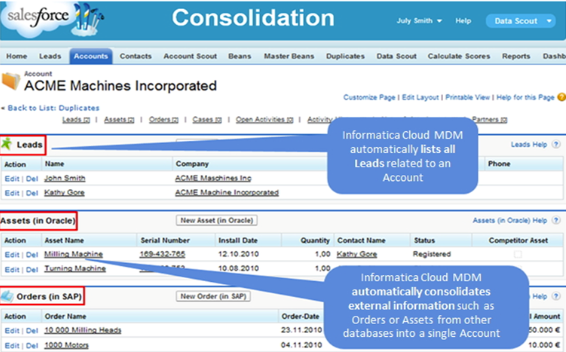
- Consolidation: Cloud MDM extends your Salesforce with enterprise-grade Master Data Management. You can also consolidate and enrich your customer data across your other corporate databases, such as SAP, Oracle, Microsoft, or others. Also builds Hierarchies.
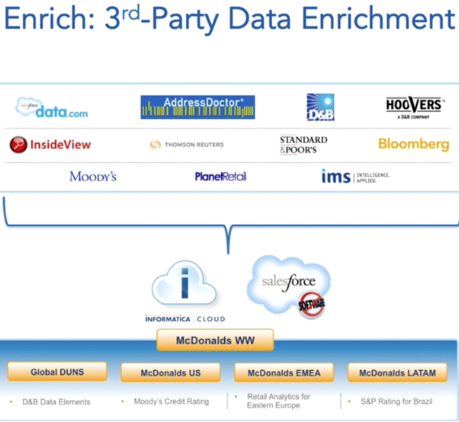
- Data Enrichment: Informatica Cloud and CloudMDM together help you pull data from multiple 3rd parties such as Data.com, D&B, Moody’s, Standard & Poors, InsideView, etc. to supplement, enrich and validate your data.
- Fuzzy Matching: The fuzzy matching engine is used by the de-duplication engine, but can also be used for hierarchal relationships to your master data.
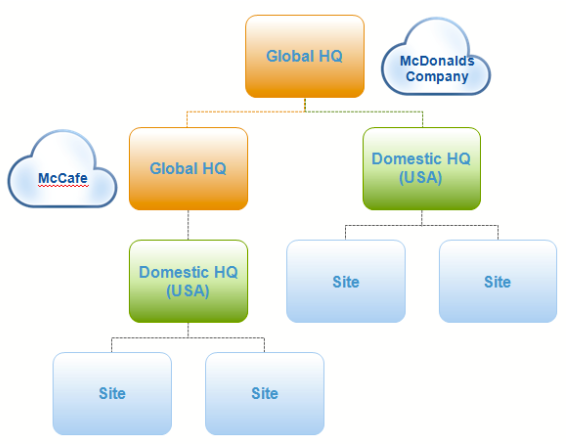
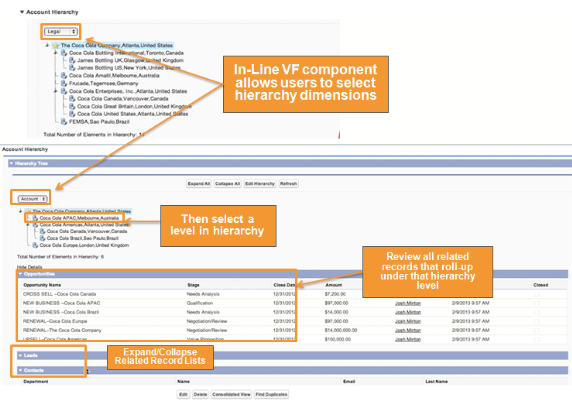
- Hierarchy Management: This is one of the best features, which we’ll talk in a little more detail about, but it essentially allows you to view multiple hierarchy dimensions.
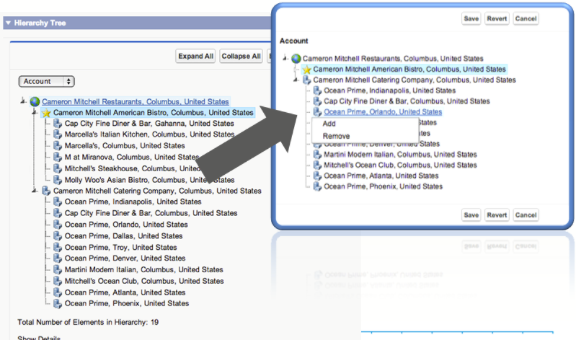
- UI Tools: The first MDM solution to provide UI tools that allows Sales, Marketing and Service reps to interact with the MDM data. See the screenshot below for one example:
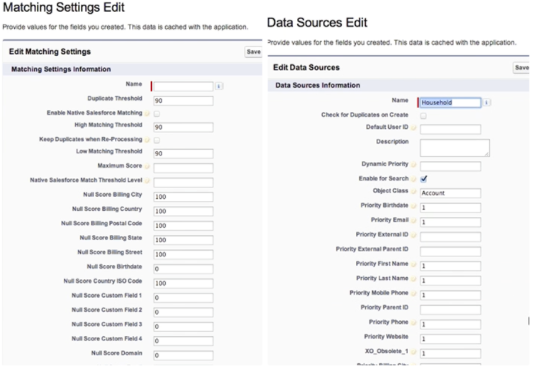
- Customizable: CloudMDM uses custom settings in Salesforce setup to configure all aspects of the app, such as applying custom logic and thresholds to Fuzzy Matching and de-duplication per data source.
Hierarchy Management
The hierarchy management essentially employs the same concepts as my poor man’s MDM solution, but takes it a step further. It creates multi-dimensional relationships between your accounts, allowing you to view your client’s or BU’s hierarchies from different aspects such as geographical, departmental, sales channels or procurement structures
Because the hierarchy management helps you create these relationships in the background, users can then interact with the hierarchies, by dragging and dropping the structures then viewing all related activity that rolls up below the selected hierarchy level.
So there you have it! MDM inside Salesforce, and we’ve covered two solutions that are bound to scale to any company size or budget.
The main concept I’d like to stress here is that there are several strategies that can be put in place to empower your personnel with more information that can help uncover opportunities for cross-sells/up-sells, or just prevent your sales reps from looking like they don’t have a clue during sales presentations. I would urge everyone to think outside the box a bit and consider how these concepts can be put into play within your Salesforce org.
Couldn't your left hand benefit from seeing what the right hand is doing?
To see how cloud MDM fits into a broader cloud governance strategy, in our infographic: The Eight Key Elements of Cloud Governance.


